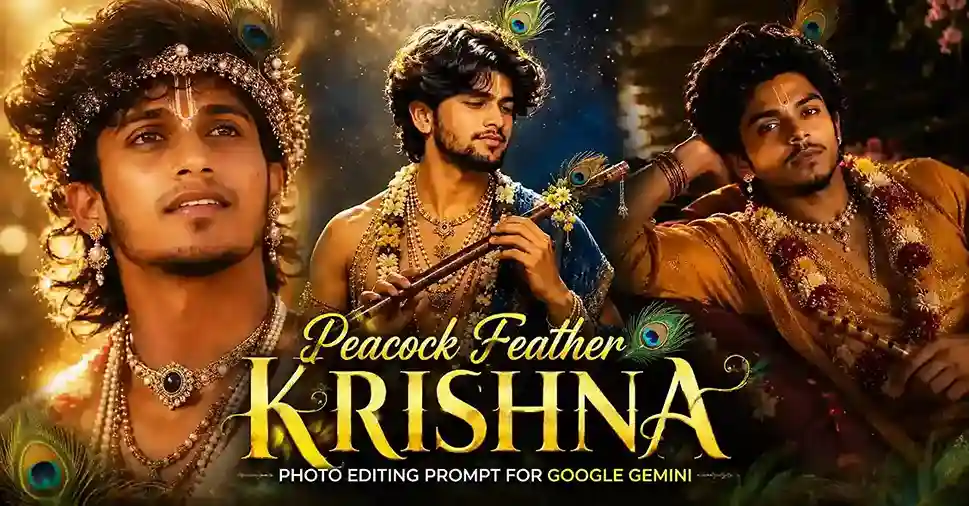
Kya aapne kabhi socha hai ki Lord Krishna ki ek aisi photo ho, jisme unka neela rang, morpankh, aur divine aura itna realistic lage Krishna-inspired AI portraits itni consistently divine kyun lagti hain, jabki inmein itni saari details hoti hain (crown, jewelry, flute, peacock feather)? Wajah hai, ye trend ek bahut structured “template” follow karta hai jisme har layer ka apna specific purpose hota hai. Is guide mein hum us anatomy ko samjhenge, taaki aap khud bhi apna version customize kar sako, sirf existing prompt copy karne ki jagah.
Table of Contents
ToggleEk Devotional Portrait Prompt Ki 6 Layers
1. Iconography anchors: Tilak, morpankh (peacock feather), aur bansuri (flute), yeh teen elements hain jo AI ko turant “Krishna-inspired” theme samjhate hain. In teeno mein se kam se kam do zaroor include karo, warna result generic royal portrait lagega, Krishna-specific nahi.
2. Crown/headpiece detail: Gold filigree, pearls, gemstones, jitna specific describe karoge utna hi crown “hand-crafted” jaisa dikhega, generic “gold crown” flat result deta hai.
3. Jewelry layering: Ek single necklace ki jagah “multiple layered pearl necklaces, gold choker, armlets” jaisa layered instruction luxury/regal feel create karta hai.
4. Lighting mood: Golden hour (warm, romantic), moonlit (cool, mystical), ya temple daylight (bright, serene), teeno alag emotion dete hain. Yehi principle humne Gemini 4K glossary mein bhi discuss kiya tha, ek lighting mood decide karo, poora prompt uske around banao.
5. Setting/background: Palace garden, temple, river, ya studio backdrop, background theme ke saath consistent honi chahiye lighting ke.
6. Camera/technical enhancers: “85mm lens, f/1.4, HDR, 8K”, yeh consistent rakhna chahiye taaki photorealistic feel bana rahe.
Peacock Feather Krishna Photo Editing Prompt for Google Gemini
Ab aate hain us cheez par jiske liye aap yahan aaye hain, best copy-paste ready prompt for peacock feather krishna!
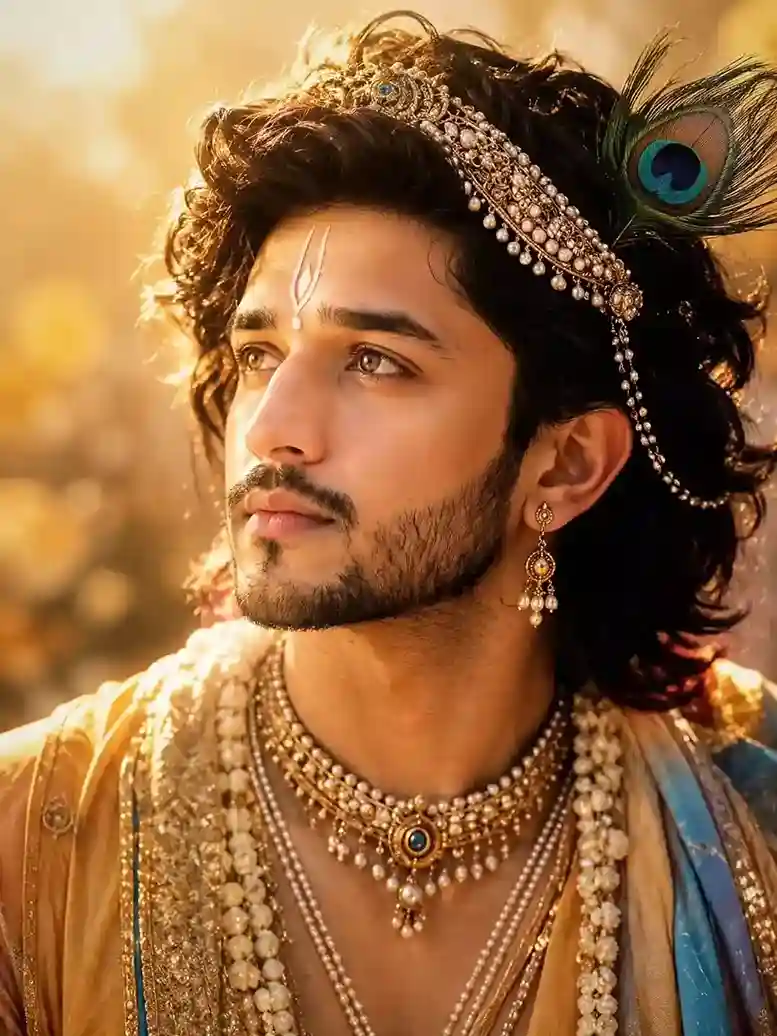
Use my face and create an Ultra-realistic cinematic portrait of a youthful male figure inspired by traditional Krishna iconography, head-and-shoulders composition, facing slightly left and gazing upward into the distance. Thick, voluminous, wavy shoulder-length dark brown to black hair with natural curls and loose strands illuminated by strong golden backlight. Warm light brown eyes with detailed irises and bright catchlights. Smooth youthful skin with subtle natural texture. Well-groomed short beard and mustache framing the jawline and lips. A delicate white Vaishnava tilak centered on the forehead, vertically aligned between the eyebrows. Ornate gold crown-like head ornament woven into the hair, richly decorated with pearls, gemstones, filigree metalwork, and dangling pearl strands. A large peacock feather positioned on the right side of the headpiece, showing vivid emerald green, turquoise blue, and deep navy eye pattern. Luxurious traditional Indian royal attire in warm cream, gold, saffron, and pale blue tones. Embroidered silk fabric with intricate metallic threadwork and ornate borders. Multiple layered pearl necklaces draped across the chest. Central gold choker featuring a round blue gemstone surrounded by pearls and gold detailing. Additional pearl garlands and decorative chains creating depth and richness. Single ornate dangling gold-and-pearl earring visible on the right ear. Golden-hour outdoor setting with dreamy ethereal atmosphere. Strong warm sunlight entering from upper left, creating glowing rim light around hair, shoulders, and jewelry. Soft amber color palette dominated by gold, honey, champagne, and warm bronze hues. Background completely out of focus with large circular bokeh highlights and creamy depth separation. Photographed with an 85mm portrait lens, shallow depth of field, f/1.4 aperture, close-up framing, subject centered slightly left of frame. Hyper-detailed facial features, realistic skin rendering, ultra-sharp eyes, cinematic color grading, HDR lighting, high dynamic range, natural skin tones, luxurious textures, professional fashion photography quality, masterpiece-level detail, photorealistic, 8k resolution, volumetric sunlight, glowing highlights, soft shadows, elegant spiritual aesthetic. Negative Prompt blurry eyes, low resolution, cartoon, anime, illustration, painting, CGI look, plastic skin, oversaturated colors, harsh shadows, extra jewelry, extra feathers, extra ears, asymmetrical face, distorted anatomy, crossed eyes, watermark, text, logo, cropped forehead, cropped jewelry, duplicate accessories, noise, grain, motion blur, flat lighting, underexposed image, overexposed highlights, modern clothing, background objects, crowd, multiple people.
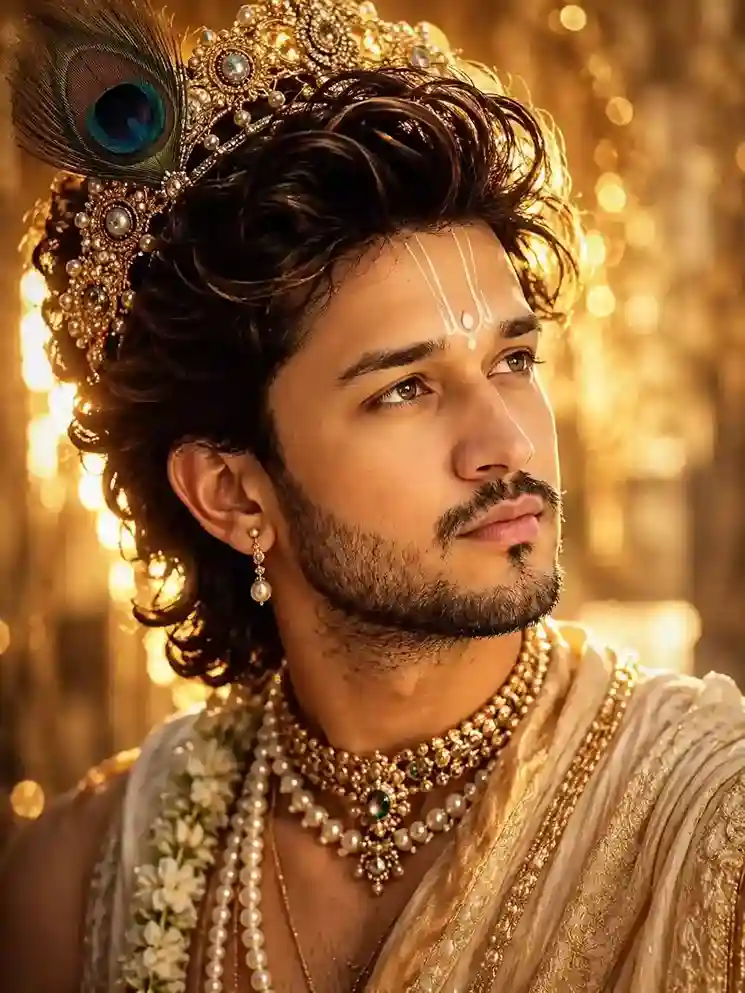
Use my face and create an Ultra-realistic cinematic portrait of a young man styled as Krishna-inspired royal mythology, chest-up framing, positioned slightly left of center, head turned toward the upper right, contemplative gaze directed into the distance. Thick voluminous dark brown hair with rich chestnut highlights, swept upward and backward in dramatic flowing waves, illuminated by intense golden rim lighting. Warm hazel-golden eyes with crisp catchlights, perfectly defined eyebrows, smooth youthful skin with subtle pores, neatly trimmed beard and mustache emphasizing a sculpted jawline. Large ornate golden crown integrated into the hair, occupying the upper-left portion of the frame. Crown constructed from intricate filigree gold work, embedded pearls, circular gemstones, and decorative floral motifs. A prominent peacock feather rises from the crown on the upper-left side, displaying vivid emerald green, turquoise blue, deep navy, and bronze coloration with a highly detailed feather-eye pattern. White Vaishnava tilak painted vertically on the forehead, consisting of three thin elegant lines with a central teardrop-shaped mark near the brows. Single pearl-drop earring hanging from the visible ear. Luxurious traditional Indian royal clothing in cream, ivory, champagne gold, and soft beige silk. Rich embroidered fabric with metallic gold thread detailing along borders and folds. Draped shawl crossing the shoulder with visible texture and intricate brocade patterns. Multiple layered pearl garlands around the neck. Elaborate gold choker necklace densely set with pearls and gemstones, featuring a central oval blue-green gemstone surrounded by intricate gold detailing and dangling ornaments. Fresh white jasmine flower garland partially visible along the left side of the chest. Background filled with luminous golden bokeh lights and softly blurred vertical forms suggestive of a palace garden or sacred grove. Strong sunset backlighting creates glowing edges around hair, crown, shoulders, and jewelry. Warm amber, honey-gold, bronze, and champagne color palette dominates the entire image. Atmospheric depth with creamy separation between subject and background. Professional portrait photography, 85mm lens, f/1.2 aperture, extremely shallow depth of field, razor-sharp eyes, ultra-detailed jewelry, cinematic HDR lighting, photorealistic skin rendering, luxury editorial quality, volumetric sunlight, soft golden haze, high dynamic range, masterpiece photography, hyperrealistic, 8k, realistic fabric textures, realistic pearls, realistic gemstones, divine regal aesthetic. Technical Style Keywords photorealistic, ultra-detailed, cinematic portrait, golden hour, luxury fashion photography, mythological royal styling, dramatic backlight, warm color grading, shallow depth of field, glowing bokeh, HDR, high contrast, realistic skin texture, ultra-sharp eyes, professional color correction, volumetric light, award-winning portrait photography. Negative Prompt cartoon, anime, painting, illustration, CGI, 3D render appearance, plastic skin, blurry eyes, low detail face, low resolution, noise, grain, motion blur, extra jewelry, extra feathers, duplicate crown elements, distorted anatomy, asymmetrical face, crossed eyes, malformed hands, extra limbs, watermark, logo, text, overexposed face, underexposed shadows, modern clothing, background people, multiple subjects, harsh flash lighting, dull colors, flat lighting, cropped crown, cropped feather.
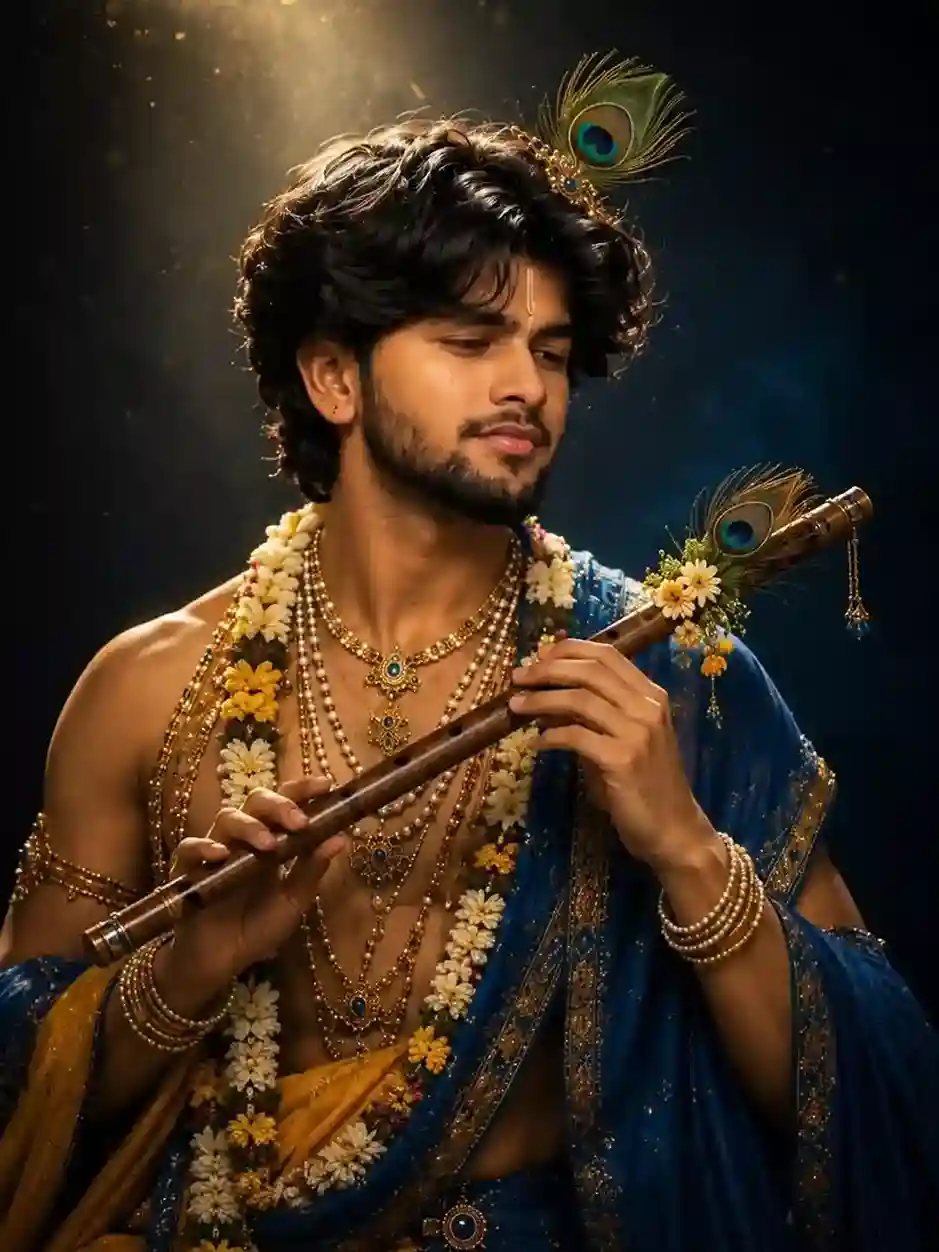
Use my face and create an Ultra-realistic cinematic portrait of a youthful Krishna-inspired musician, vertical composition, waist-up framing, centered in the image. Young man with medium warm-brown skin tone, thick wavy black hair with soft curls and natural volume, slightly tousled, illuminated by dramatic overhead rim lighting. Short well-groomed beard and mustache, defined jawline, calm introspective facial expression, eyes gently lowered toward the flute, soft peaceful smile. A single peacock feather ornament attached to a delicate gold headpiece above the forehead, featuring vibrant emerald green, turquoise blue, teal, bronze, and navy coloration. Small golden tilak mark centered between the eyebrows. The subject holds a traditional wooden bansuri flute diagonally across the chest from lower left to upper right. Rich brown polished bamboo texture with visible finger holes and metallic decorative rings. Additional peacock feather and small floral decorations attached near the flute’s upper end. Hands positioned naturally on the flute, fingers relaxed and elegant. Multiple layers of luxurious jewelry: long pearl necklaces, gold chains, gemstone pendants, intricate chokers, blue sapphire-like stones set in gold, stacked pearl bracelets, gold armlets, ornate waist ornament. Thick floral garlands composed of white jasmine-like flowers, yellow blossoms, and small pink accents draped around the neck and chest. Traditional Krishna-inspired clothing in deep royal blue and saffron-gold. Rich flowing silk drapery with elaborate gold embroidery and metallic threadwork. One shoulder exposed while a royal blue embroidered shawl cascades across the torso and arms. Fabric displays intricate brocade patterns, delicate gold borders, and realistic folds. Dark mystical studio background with deep navy-blue and black gradient. Strong heavenly spotlight descending from the upper left corner, creating visible volumetric light rays and floating golden dust particles. Dramatic chiaroscuro lighting with bright highlights on hair, shoulders, jewelry, flute, and floral garlands. Background remains softly blurred with subtle atmospheric haze. Color palette dominated by royal blue, gold, saffron, pearl white, warm bronze, and emerald peacock tones. High contrast between luminous subject and dark background. Professional fine-art portrait photography, 85mm lens, f/1.8 aperture, shallow depth of field, ultra-detailed skin texture, hyper-realistic jewelry, cinematic color grading, HDR lighting, volumetric god rays, luxury editorial photography, museum-quality portrait, photorealistic, masterpiece, ultra-sharp focus, 8k resolution, realistic fabric physics, realistic flowers, realistic pearls, spiritual divine atmosphere. Composition Details Vertical 4:5 portrait orientation Subject centered Waist-up crop Flute crossing diagonally through frame Overhead spotlight from upper left Dark negative space surrounding subject Strong rim lighting around hair and shoulders Soft falloff into shadows Negative Prompt cartoon, anime, painting, illustration, CGI, 3D render, plastic skin, low detail face, blurry eyes, extra fingers, malformed hands, distorted flute, duplicate jewelry, extra peacock feathers, extra limbs, asymmetrical anatomy, low resolution, noise, grain, watermark, logo, text, overexposed highlights, underexposed face, flat lighting, modern clothing, multiple people, cropped hands, cropped flute, background objects, poor fabric detail, unrealistic flowers, unrealistic pearls.
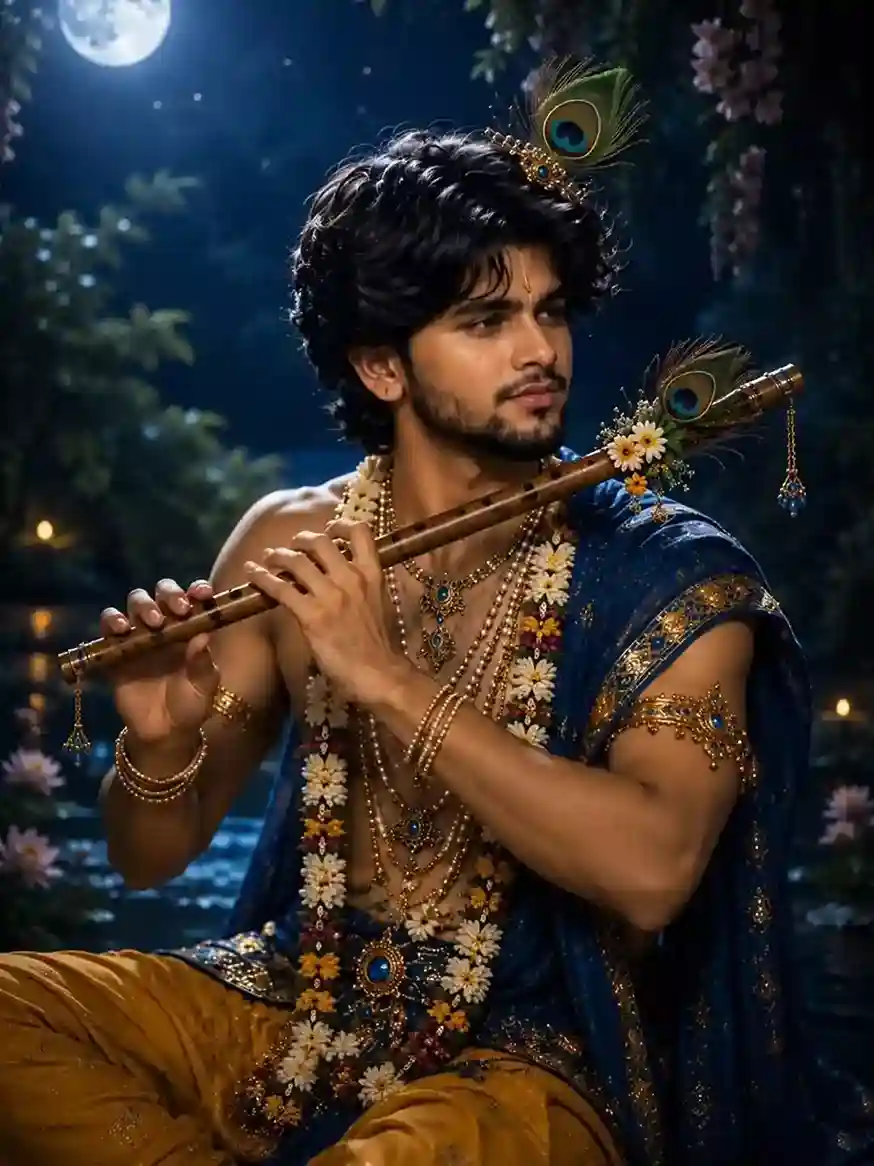
Use my face and create an Ultra-realistic cinematic Krishna-inspired night portrait, full upper-body composition, seated beside a moonlit river. Young man with medium warm-brown skin, athletic lean physique, thick voluminous black wavy hair with soft curls and natural texture, illuminated by cool moonlight and subtle rim lighting. Well-defined jawline, neatly groomed beard and mustache, calm contemplative expression, looking toward the right side of the frame. Small golden tilak centered on the forehead. An ornate golden hair ornament with embedded blue gemstones supports a large peacock feather positioned above the crown of the head. Feather displays highly detailed emerald green, turquoise, cobalt blue, and bronze eye pattern with realistic filaments. The subject holds a traditional wooden bansuri flute horizontally near the mouth, both hands visible in a natural flute-playing position. Polished brown bamboo texture with visible finger holes, metallic accents, hanging blue gemstone charms, floral decorations, and additional peacock feathers attached near the flute’s end. Rich Krishna-inspired attire consisting of deep royal-blue silk drapery and saffron-gold dhoti fabric. The blue shawl cascades over the shoulders and arms with intricate gold embroidery, gemstone embellishments, metallic thread patterns, and luxurious folds. Bare upper torso partially visible beneath layers of jewelry. Multiple ornate necklaces composed of pearls, gold chains, blue gemstones, and intricate pendants. Long floral garland made of white daisies, yellow flowers, pink blossoms, and green foliage draped from shoulders to waist. Gold armlets, layered bracelets, gemstone-studded ornaments, and an elaborate waist jewel featuring a large blue central gemstone. Enchanting moonlit forest setting. Full moon positioned in the upper-left corner casting cool silver-blue illumination across the scene. Dense foliage, hanging flowers, and flowering vines frame the composition. Reflective water surface behind the subject with moonlight reflections and soft ripples. Small glowing lamps and distant points of warm light create atmospheric depth. Color palette combines deep midnight blue, indigo, silver moonlight, royal blue fabric, saffron gold clothing, warm gold jewelry, emerald peacock accents, and white floral highlights. Strong contrast between cool ambient moonlight and warm decorative lights. Professional fantasy portrait photography, 85mm lens, f/1.8 aperture, shallow depth of field, cinematic composition, photorealistic skin texture, realistic jewelry rendering, realistic flowers, volumetric moonlight, atmospheric haze, subtle mist over water, ultra-detailed embroidery, HDR lighting, hyperrealistic, masterpiece quality, luxury editorial photography, divine mythology aesthetic, ultra-sharp focus, 8k resolution. Composition Breakdown Vertical portrait orientation (4:5 ratio) Subject seated slightly right of center Flute forms a strong horizontal line across upper torso Full moon in upper-left corner River or pond in background Hanging flowers framing upper corners Floral garland creating vertical visual flow Rich foreground-to-background depth separation Subject occupies approximately 70% of frame height Lighting Primary cool moonlight from upper left Soft rim lighting around hair and shoulders Warm secondary illumination from distant lamps Reflective highlights on jewelry and flute Gentle shadow transitions on face Atmospheric volumetric light through foliage Negative Prompt cartoon, anime, painting, illustration, CGI appearance, plastic skin, blurry face, blurry eyes, extra fingers, fused fingers, malformed hands, distorted flute, duplicate jewelry, extra peacock feathers, extra limbs, asymmetrical anatomy, low resolution, grain, noise, watermark, logo, text, modern clothing, artificial pose, flat lighting, overexposed moon, underexposed subject, unrealistic flowers, unrealistic water reflections, cropped hands, cropped flute, background people, multiple subjects, poor embroidery detail, low-quality jewelry, exaggerated muscles, harsh shadows.
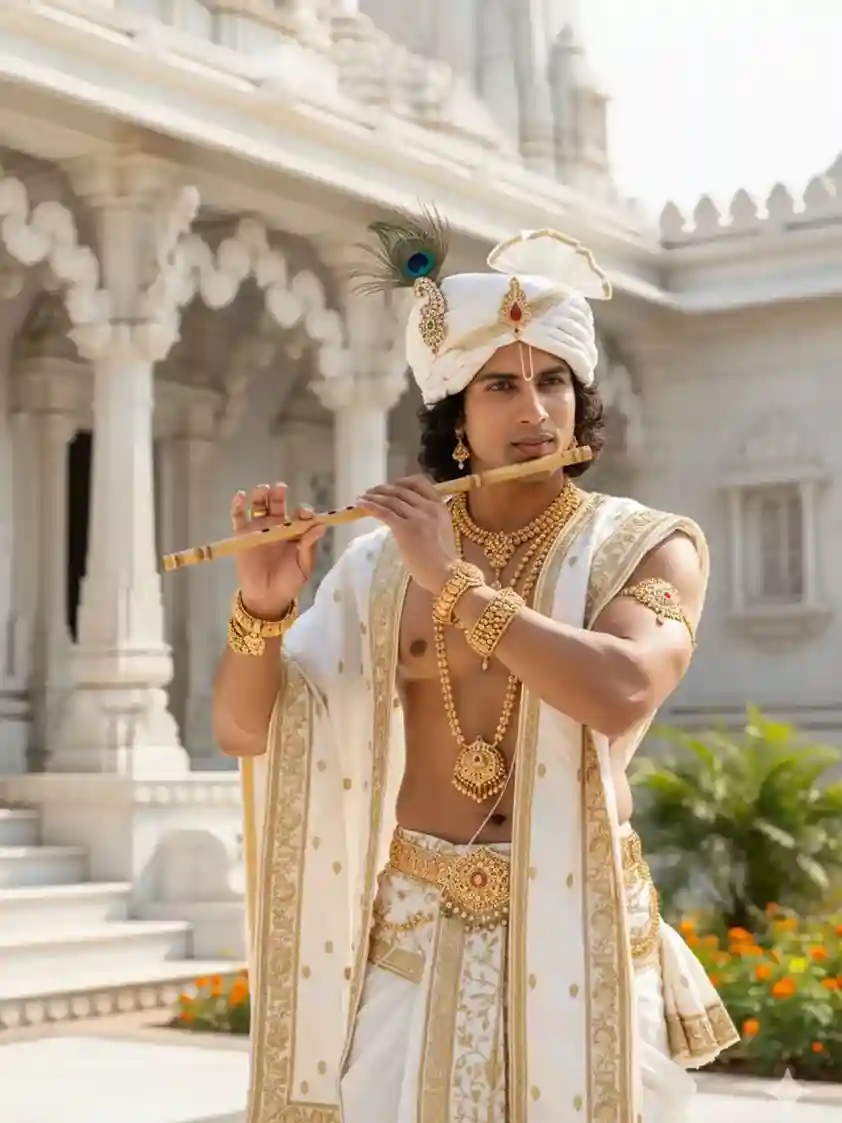
Use face reference from uploaded image. A photorealistic portrait of a handsome South Asian male model dressed as Lord Krishna, wearing traditional white and gold Indian attire, a white turban with a peacock feather accent, and elaborate gold jewelry including necklaces, bracelets, and a waist belt. He is holding a bamboo flute to his lips. He has a tilak mark on his forehead. The background is a grand, traditional gold and white temple or palace, shot outdoors in bright natural light. The mood is divine, serene and majestic.
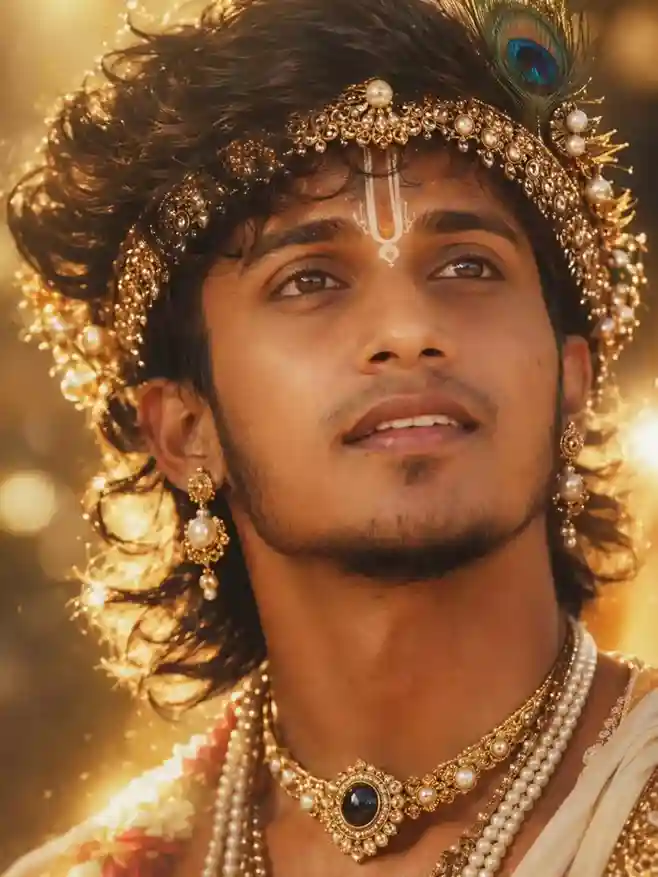
Ultra-detailed cinematic close-up portrait of a young Indian man styled as a divine Krishna-inspired figure, warm golden sunset lighting, dreamy ethereal aesthetic, vertical 9:16 composition. Flawless glowing warm-toned skin, hazel-brown eyes looking upward, defined masculine features, thick brows, soft parted lips, calm spiritual expression. Dark wavy hair flowing naturally with wispy strands. Ornate pearl-and-gold crown, layered pearl jewelry, gemstone choker, gold earrings, peacock feather, sacred white tilak and devotional markings. Dramatic golden sunlight, volumetric glow, cinematic shadows, dreamy bokeh, shallow depth of field, hyper-realistic skin texture, editorial fashion photography, photorealistic, 8K ultra-detail, mystical regal Krishna aesthetic.
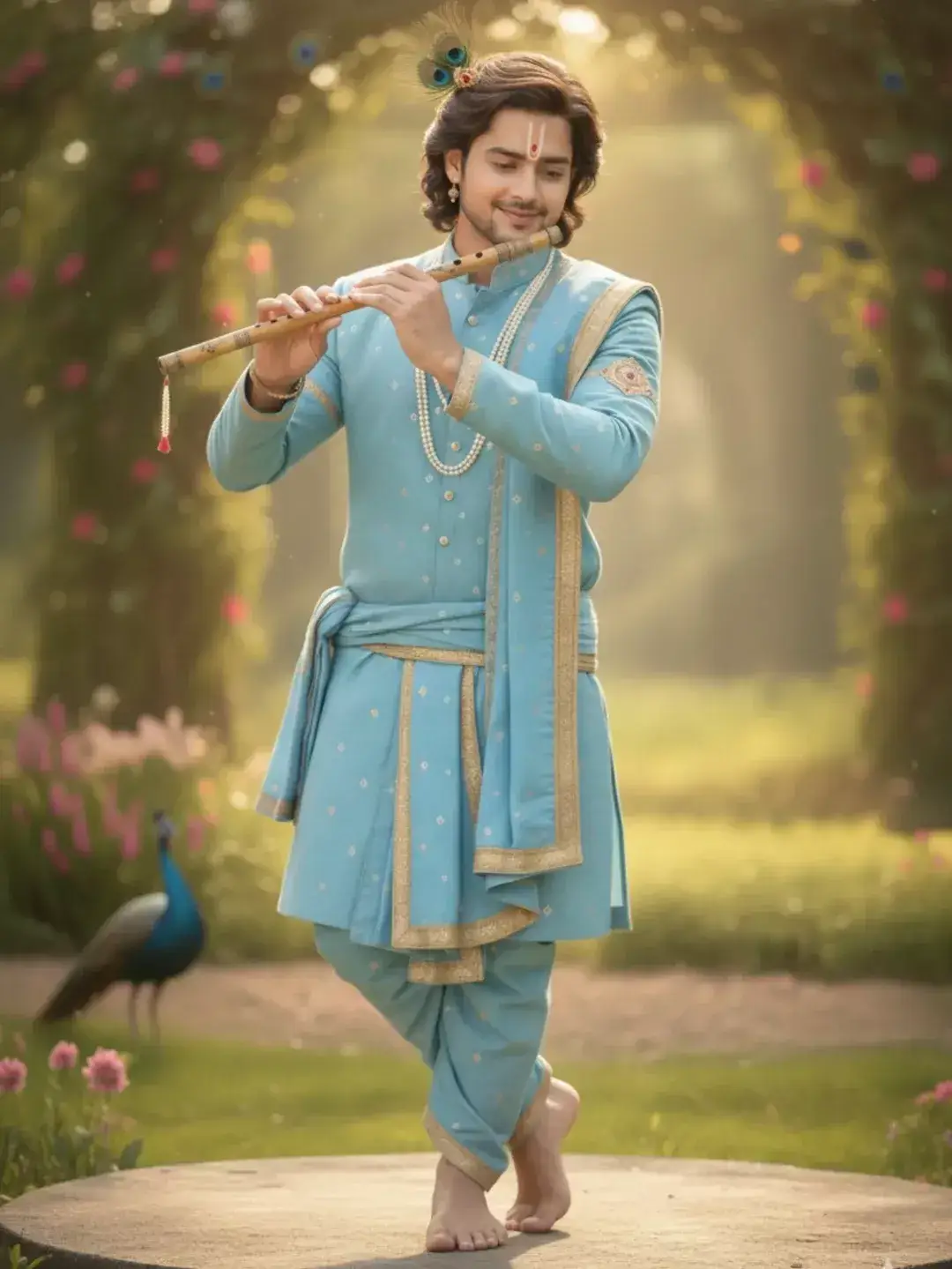
Use my face and create an Ultra-realistic full-body portrait of a youthful Krishna-inspired figure standing gracefully while playing a wooden bansuri flute. Young man with fair-to-medium warm skin tone, soft symmetrical facial features, shoulder-length wavy dark brown hair with subtle highlights, neatly groomed light beard and mustache, gentle smile, serene expression, eyes lowered toward the flute. White Vaishnava tilak with a red central mark painted vertically on the forehead. A delicate peacock-feather ornament is attached to the hair above the crown, featuring vibrant emerald green, teal, sapphire blue, and bronze eye patterns. Small traditional earrings and a long pearl necklace complete the appearance. The subject wears an elegant pastel sky-blue traditional Indian outfit consisting of a finely tailored kurta, dhoti-style trousers, and a matching draped stole. Fabric is richly detailed with subtle embroidered motifs, tiny reflective embellishments, and luxurious gold borders. Soft flowing textiles with realistic folds and premium silk-blend texture. Bare feet visible. The figure stands in a classic graceful pose with one leg crossed in front of the other, balancing lightly on the toes. Both hands naturally positioned on a bamboo flute held horizontally near the lips. Light brown polished bansuri with visible finger holes, natural bamboo grain, and a decorative tassel hanging from one end. Enchanting garden setting during golden hour. Large floral archway frames the subject from behind, covered in lush greenery and scattered pink blossoms. Soft sunlight streams through the arch, producing glowing atmospheric rays and dreamy backlighting. Background consists of a manicured garden with warm green grass, flowering plants, and creamy bokeh. A peacock stands in the lower-left background, partially out of focus, adding visual balance and reinforcing the Krishna-inspired theme. Foreground flowers are softly blurred. Circular stone platform beneath the subject. Color palette dominated by pastel blue, soft gold, warm cream, gentle green, blush pink flowers, and natural sunlight tones. Bright, airy, romantic atmosphere with a fairytale garden aesthetic. Professional fashion portrait photography, full-body composition, 135mm lens, f/2.0 aperture, shallow depth of field, creamy bokeh, ultra-realistic skin texture, luxury editorial photography, cinematic color grading, natural sunlight, volumetric light rays, HDR lighting, high dynamic range, hyperrealistic, masterpiece quality, 8k resolution, soft dreamy focus in background, razor-sharp subject, elegant posture, premium fabric rendering. Composition Details Vertical portrait orientation (2:3 ratio) Full-body framing Subject centered Floral arch forms a natural frame around the figure Peacock positioned in lower-left background Circular stone platform at bottom center Sunlight entering from behind and above Strong depth separation between subject and background Symmetrical, balanced composition Lighting Warm golden-hour sunlight Backlit subject with glowing hair edges Soft frontal fill light Gentle shadows Diffused natural illumination Atmospheric haze catching sunlight Bright, airy, romantic mood Negative Prompt cartoon, anime, illustration, painting, CGI, 3D render, plastic skin, blurry face, blurry eyes, distorted hands, extra fingers, extra limbs, malformed feet, duplicated flute, duplicate peacock feathers, asymmetrical anatomy, poor posture, low resolution, grain, noise, watermark, logo, text, harsh shadows, overexposed highlights, underexposed face, modern clothing, multiple people, crowded background, unrealistic flowers, unrealistic peacock, cropped feet, cropped flute, dark atmosphere, messy composition, low-detail fabric, inaccurate embroidery, exaggerated facial features.
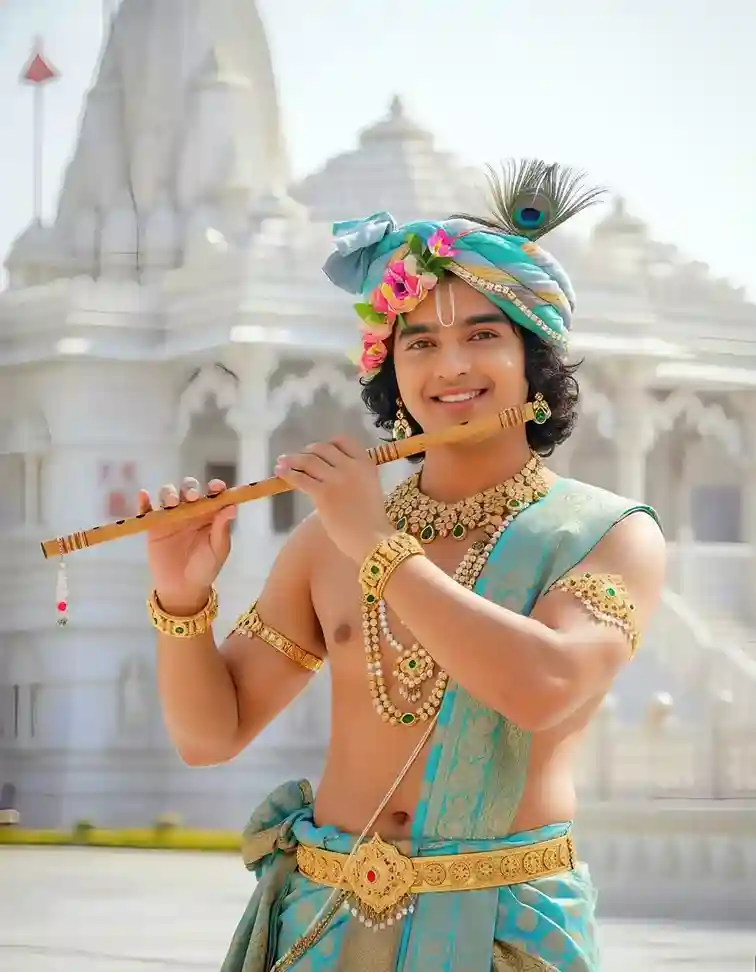
Use my face and create an Ultra-realistic devotional portrait of a youthful Krishna-inspired figure standing in front of a magnificent white marble Hindu temple. Young male with smooth fair-to-medium skin tone, youthful face, large expressive dark brown eyes, gentle smile, clean complexion, soft rounded facial features, shoulder-length naturally curly black hair visible beneath a decorative turban. The subject wears a luxurious turquoise, aqua-blue, and mint-green silk turban wrapped elegantly around the head. The turban is adorned with fresh pink flowers, delicate gold trim, and a prominent peacock feather displaying vivid emerald green, teal, cobalt blue, and bronze eye markings. A white Vaishnava tilak is centered vertically on the forehead. Traditional Krishna-inspired attire consisting of an aqua-blue silk dhoti and draped sash featuring intricate gold brocade patterns, woven floral motifs, metallic embroidery, and rich ornamental borders. Bare upper torso with graceful proportions. Ornate gold waistband with a large central pendant featuring a red gemstone. Decorative silk folds and layered fabric wrapping around the waist. Multiple layers of luxurious jewelry including: Heavy gold necklace with emerald-green gemstones Layered pearl garlands Gemstone pendants with green stones Gold armlets on both upper arms Wide gold bracelets and bangles Traditional earrings with green gemstones Elaborate waist ornament and decorative chain details The subject holds a polished bamboo bansuri flute horizontally near the lips in a natural playing pose. Light golden-brown bamboo texture with visible finger holes, decorative metallic rings, and a small tassel hanging from one end. Background features an expansive white marble temple complex with highly detailed domes, spires, carved pillars, arches, and ornate architectural details. Temple softly blurred due to shallow depth of field. Bright open courtyard visible in the foreground. Lighting is bright natural daylight with soft diffused sunshine. High-key exposure with luminous whites, clean highlights, gentle shadows, and soft radiant skin tones. Airy atmosphere with subtle haze. Color palette dominated by white marble, turquoise silk, gold jewelry, emerald gemstones, pink flowers, and natural skin tones. Professional portrait photography, medium shot framing from waist to head, 85mm lens, f/2.8 aperture, shallow depth of field, ultra-realistic skin texture, photorealistic jewelry rendering, realistic fabric textures, HDR photography, luxury editorial portrait, devotional aesthetic, cinematic color grading, hyperrealistic, masterpiece quality, 8k resolution, ultra-sharp focus on face and eyes. Composition Details Vertical portrait orientation Subject centered in frame Waist-up composition Temple architecture filling background Flute creating a horizontal visual line across upper body Symmetrical architectural balance Bright airy atmosphere Clean uncluttered composition Lighting Specifications Soft natural daylight Bright high-key exposure Gentle front lighting Minimal harsh shadows Smooth skin illumination Soft temple highlights Clean white balance Subtle atmospheric haze Negative Prompt cartoon, anime, painting, illustration, CGI, 3D render, plastic skin, low resolution, blurry face, blurry eyes, distorted anatomy, extra fingers, fused fingers, malformed hands, extra arms, extra jewelry, duplicate flute, extra peacock feathers, asymmetrical face, watermark, logo, text, dark lighting, dramatic shadows, underexposed image, oversaturated colors, modern clothing, background people, crowded scene, poor temple detail, unrealistic gemstones, unrealistic fabric folds, cropped hands, cropped flute, low-quality architecture, noisy image, grain, motion blur.
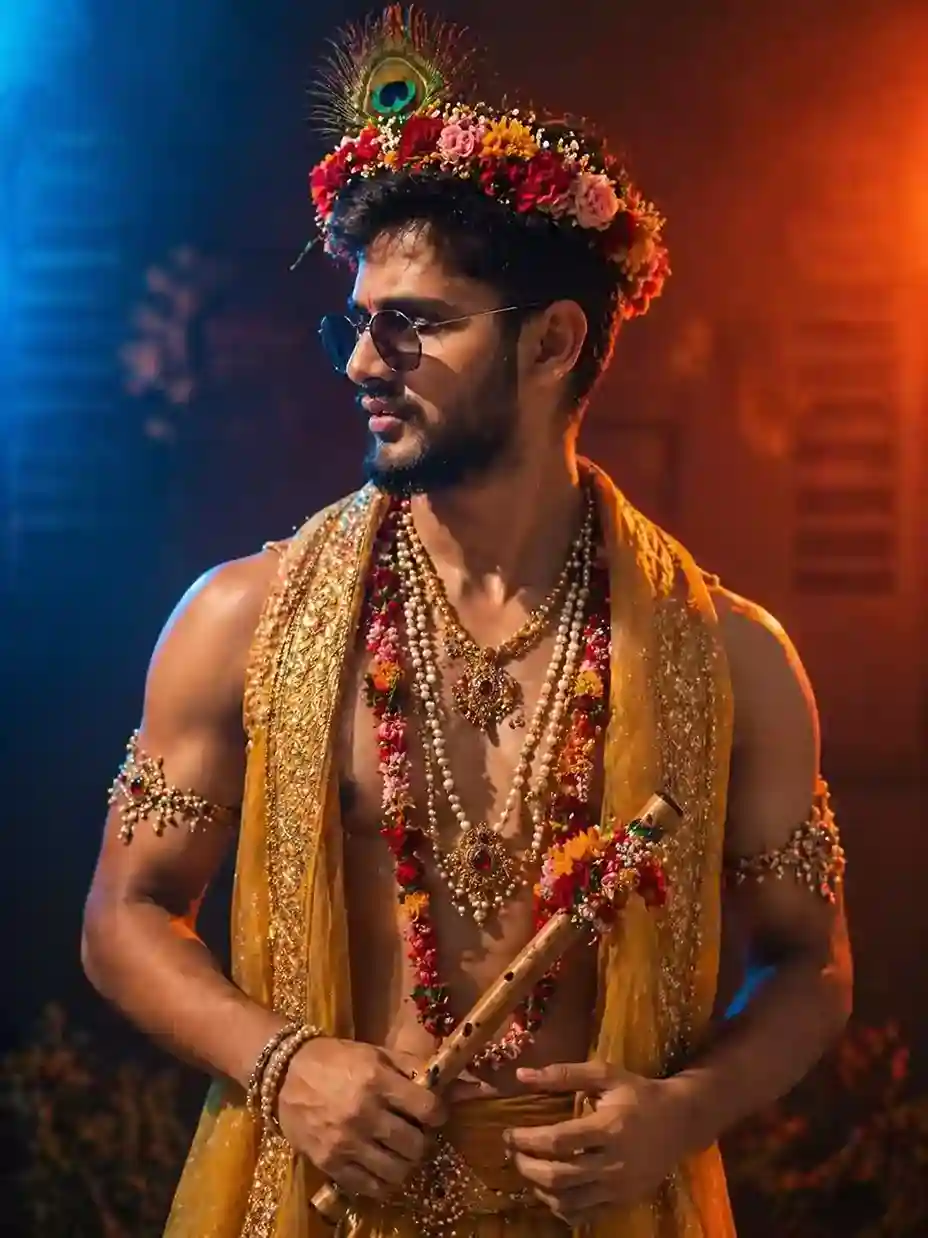
Use my face and create an Ultra-realistic cinematic portrait of a modern Krishna-inspired young man blending traditional devotional aesthetics with contemporary fashion. Medium-shot composition from waist to head, athletic lean physique, warm medium-brown skin tone with realistic texture, defined shoulders and arms, neatly trimmed beard and mustache, short textured black hair. Subject turned three-quarters left, looking off-frame with a confident, contemplative expression. A vibrant floral crown sits across the head, densely woven from fresh red roses, pink roses, orange marigold-like flowers, yellow blossoms, and tiny white filler flowers. A single large peacock feather rises from the center of the crown, displaying vivid emerald green, turquoise blue, deep navy, and bronze iridescence. Modern dark-tinted aviator sunglasses with thin metallic frames. Small red tilak mark centered above the eyebrows. The subject is shirtless, draped in a luxurious saffron-gold translucent shawl flowing over both shoulders. Fabric features intricate gold embroidery, sequins, beadwork, metallic thread patterns, and ornate borders. Rich textile texture with shimmering highlights. Multiple layers of jewelry: Long pearl necklaces of varying lengths Ornate gold pendants set with deep red gemstones Floral garlands made of red, pink, orange, and yellow flowers Decorative gemstone armlets on both upper arms Pearl bracelets and beaded wrist ornaments Traditional waist ornament with jewel details A polished bamboo bansuri flute held diagonally across the torso, decorated with small flowers near the upper section. Visible finger holes, realistic bamboo grain, warm honey-brown wood tones, and subtle metallic accents. Dramatic cinematic studio atmosphere with contrasting color lighting. Strong cool blue light illuminating the left side of the frame and warm fiery orange-red light illuminating the right side. Subject positioned between both color sources, creating striking color separation and cinematic contrast. Soft haze and atmospheric smoke visible in the background. Background consists of a dark, moody, out-of-focus environment with hints of rustic architecture, warm glowing bokeh lights, and colored fog. Rich contrast between deep shadows and vibrant highlights. Color palette dominated by saffron gold, crimson red, floral multicolor accents, peacock emerald-blue tones, cool electric blue lighting, and warm amber-orange lighting. Professional fashion photography, cinematic editorial portrait, 85mm lens, f/1.8 aperture, shallow depth of field, dramatic rim lighting, photorealistic skin texture, realistic fabric rendering, realistic jewelry reflections, ultra-detailed flowers, HDR lighting, hyperrealistic, luxury magazine quality, masterpiece photography, 8k resolution, high contrast, volumetric haze, ultra-sharp focus on face and upper body. Style Keywords modern Krishna aesthetic, devotional fashion editorial, cinematic color contrast, blue-orange lighting, luxury portrait photography, dramatic mood, festival-inspired styling, photorealistic, high-end fashion campaign, volumetric atmosphere, ultra-detailed realism. Composition Details Vertical portrait orientation Waist-up framing Subject slightly off-center Three-quarter profile view Flute positioned diagonally across body Floral crown forms upper focal point Strong blue light from left Strong orange-red light from right Dark atmospheric background Lighting Setup Dual-color cinematic lighting Cool blue key light from left side Warm orange-red key light from right side Soft rim lighting around shoulders and hair Controlled highlights on jewelry and flute Atmospheric haze catching colored light Deep cinematic shadows Negative Prompt cartoon, anime, illustration, painting, CGI, 3D render, plastic skin, blurry face, blurry eyes, distorted anatomy, extra fingers, fused fingers, malformed hands, duplicate flute, extra jewelry, extra peacock feathers, asymmetrical face, low resolution, noise, grain, watermark, logo, text, washed-out colors, flat lighting, overexposed highlights, underexposed subject, modern background objects, multiple people, poor flower detail, unrealistic gemstones, low-quality embroidery, cropped hands, cropped headpiece, motion blur, oversharpening.
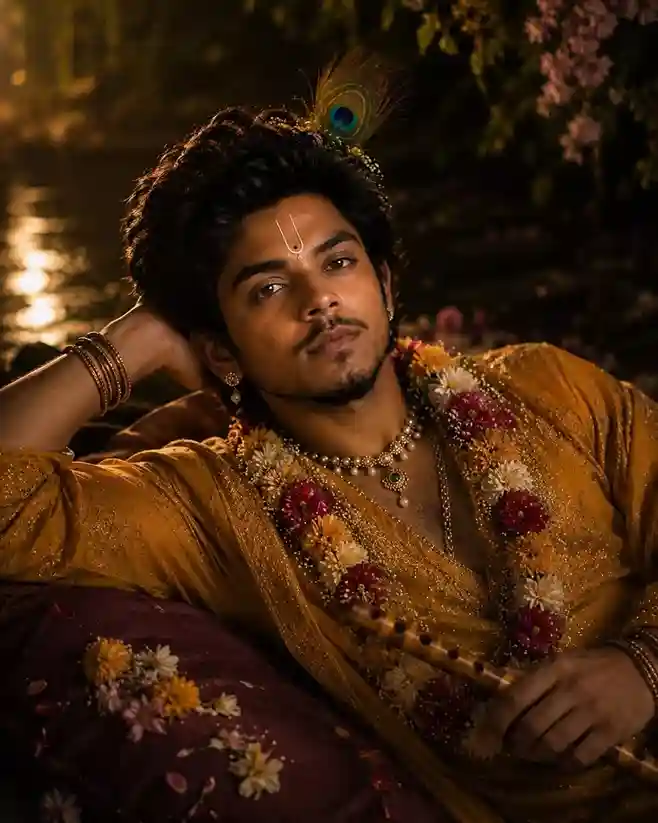
Use my face and create an Ultra-realistic cinematic portrait of a Krishna-inspired young man reclining beside a moonlit river at night. Medium close-up composition, subject positioned diagonally across the frame, resting comfortably on a large burgundy velvet cushion decorated with scattered flower petals. Young man with warm medium-brown skin, thick voluminous black hair styled in soft waves, expressive dark brown eyes, defined eyebrows, neatly groomed mustache and short goatee, calm confident gaze directed toward the camera. A delicate peacock feather ornament emerges from the hair above the crown, displaying vivid emerald green, teal, sapphire blue, and bronze iridescence. White Vaishnava tilak with a central dark dot placed vertically on the forehead. Small gold earrings with pearl accents visible on the ear. Luxurious saffron-gold traditional attire crafted from shimmering silk fabric. The garment is richly textured with fine metallic embroidery, glittering threadwork, and subtle sequined highlights that catch the warm ambient light. Soft folds and draping create elegant volume across the torso and arms. Floral garland draped around the neck, composed of densely arranged chrysanthemums and daisy-like blossoms in cream, white, yellow, orange, and deep crimson tones. Additional jewelry includes layered pearl necklaces, a gold pendant with an emerald-green gemstone, slim gold chains, stacked gold bangles on both wrists, and delicate ornamental details. A polished bamboo bansuri flute rests diagonally across the lower torso, partially held in the right hand. Realistic bamboo grain, visible finger holes, warm honey-brown wood coloration, subtle wear marks, and natural texture. Enchanting nighttime riverside setting. Dark reflective water occupies the background with shimmering golden reflections from distant unseen lights. Warm amber highlights dance across the water surface. Hanging flowering branches descend from the upper-right corner, covered in clusters of soft pink blossoms and dark green foliage. Background remains heavily blurred, creating deep atmospheric separation. Lighting is dramatic and cinematic. Warm golden light from the left side illuminates the face, garments, and flowers, producing soft highlights and rich shadow gradients. Subtle rim lighting outlines the hair and shoulders. Deep shadows maintain a moody devotional atmosphere while preserving facial detail. Color palette dominated by saffron gold, warm amber, burgundy, crimson flowers, cream blossoms, deep forest greens, and dark bronze shadows. Rich contrast between glowing highlights and dark surroundings. Professional fine-art portrait photography, 85mm lens, f/1.4 aperture, extremely shallow depth of field, cinematic color grading, luxury editorial portrait, photorealistic skin texture, realistic flower rendering, realistic jewelry reflections, HDR lighting, volumetric atmosphere, masterpiece quality, hyperrealistic, ultra-detailed, 8k resolution, award-winning portrait photography, divine devotional aesthetic. Composition Details Vertical portrait orientation Reclining pose occupying most of the frame Head positioned near upper center Left arm bent behind head as support Flute crossing the lower foreground diagonally Burgundy cushion visible beneath the subject Hanging blossoms framing the upper-right corner River reflections in left background Strong subject-background separation Lighting Details Warm amber key light from upper-left Soft shadow transitions across face Gentle catchlights in eyes Golden reflections on jewelry Subtle rim lighting around hair Dark cinematic background Moody devotional atmosphere Negative Prompt cartoon, anime, illustration, painting, CGI, 3D render, plastic skin, blurry eyes, blurry face, low resolution, grain, noise, oversharpening, distorted anatomy, extra fingers, fused fingers, malformed hands, duplicate flute, extra peacock feathers, extra jewelry, asymmetrical face, watermark, logo, text, modern clothing, harsh flash, overexposed highlights, underexposed face, unrealistic flowers, unrealistic jewelry, cropped hands, cropped head, multiple people, cluttered background, flat lighting, low-detail fabric, poor skin texture, motion blur.
Agar aapko is tarah ka do-color dramatic lighting kisi aur theme mein bhi try karna hai (jaise dark-fantasy), humara dark fantasy compositing guide usi lighting-consistency principle ko alag context mein explain karta hai.
Settings Jo Result Ko Sharp Rakhte Hain
| Setting | Recommended | Reason |
|---|---|---|
| Aspect Ratio | 4:5 | Instagram portrait ke liye best |
| Detail Level | Maximum | Crown/feather ki intricate details ke liye |
| Lighting | Cinematic | Divine glow effect ke liye |
| Background | Temple ya soft bokeh | Spiritual feel enhance karta hai |
Gemini Mein Kaise Use Karein
- gemini.google.com open karo, Google account se login karo
- Upar diya koi ek prompt copy-paste karo
- Ek clear, front-facing reference photo upload karo
- Generate karo, download karke share karo
Apna Khud Ka Version Banane Ke Liye Quick Swaps
- Mood badalna hai? Sirf lighting layer badlo: “golden hour” ↔ “moonlit” ↔ “bright temple daylight”
- Setting badalna hai? “Vrindavan temple with lotus ponds”, “Yamuna river banks”, “Dwarka palace ocean view” try karo
- Zyada cinematic chahiye? “Shot on RED camera”, “Unreal Engine 5 render quality” jaise enhancer words add karo
Agar prompt ko aur refine karna hai, humare Prompt Optimizer aur Negative Prompt Generator tools directly kaam aate hain.
Summary
- Devotional Krishna portraits ek structured 6-layer template follow karte hain, iconography, crown, jewelry, lighting, setting, aur camera enhancers
- Iconography anchors (tilak, feather, flute) mein se kam se kam do zaroor rakho, warna theme generic lagega
- Ek hi lighting mood pe stick karo, poora prompt usi ke around banao
Agli baar apna khud ka version banate waqt, upar diya 6-layer anatomy checklist use karo, ek-ek layer decide karke prompt banao, poora paragraph memory se likhne ki jagah.
Conclusion
Toh dosto, ab aapke paas hai ek complete toolkit, detailed prompt, best settings, step-by-step guide aur 10 amazing variations. Peacock Feather Krishna AI photo banana ab rocket science nahi raha!
Google Gemini ek magical tool hai jo aapki creative vision ko divine reality mein badal sakta hai. Iss article mein diye gaye prompts try karo, experiment karo, aur apni favorite variations create karo.
Apni banai hui Peacock Feather Krishna images social media par share zaroor karna, #PeacockFeatherKrishna #KrishnaAIArt hashtags use karo. Aur haan, iss guide ko apne bhakti-loving dosto ke saath bhi share karo! Jai Shri Krishna!
